
Set up a laptop docking station: Set up the original Surface Dock
Set up a laptop docking station
Identify the dock model before following setup instructions, then connect its power and the appropriate accessory ports. Screens, networking and audio should be tested individually. Connecting everything at once can make it harder to tell whether a problem comes from host compatibility, power or a particular peripheral.
Recognize a Surface Connect desktop dock
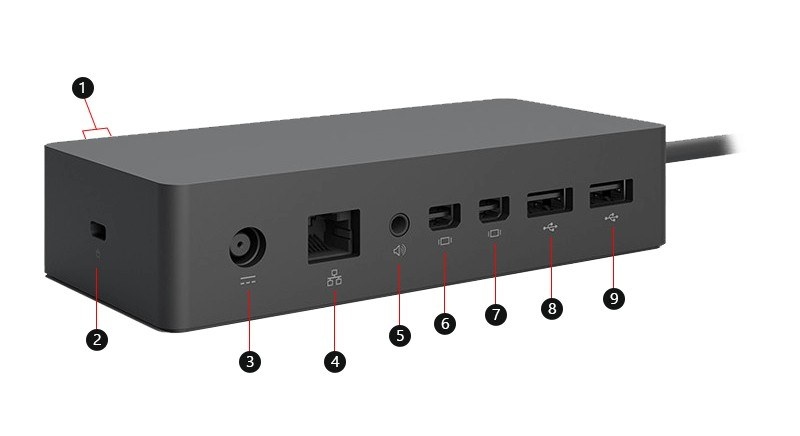
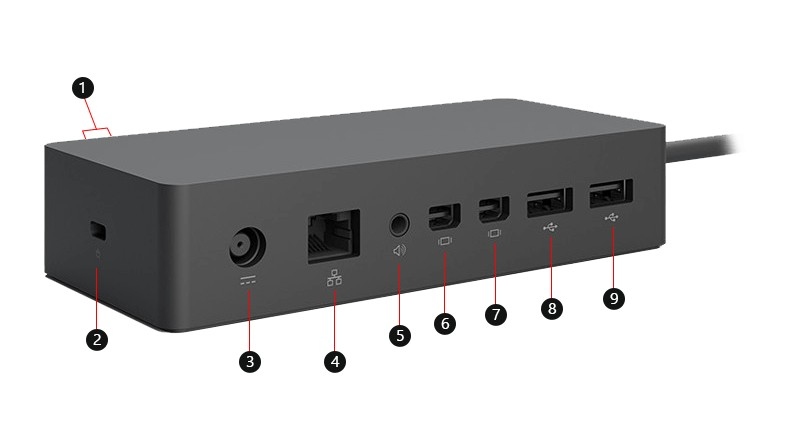
The original Surface Dock combines USB 3 ports, Mini DisplayPort outputs, Ethernet and an audio socket through a Surface Connect host connection. Its external power supply is part of the setup. These connections differ from newer USB-C docks, so cable selection and display compatibility should be checked against this particular model.
Separate supply rating from laptop charging
Microsoft lists a 90W power supply and up to 60W of power delivered to the host. The larger supply number is not the amount guaranteed to reach the computer. Connect power and the required peripherals, then check the compatible Surface models and supported display configuration. This product-specific information is more useful than assuming all docks with two video sockets have identical capabilities.
The original Surface Dock combines USB 3 ports, Mini DisplayPort outputs, Ethernet and an audio socket through a Surface Connect host connection. Identify the dock model before following setup instructions, then connect its power and the appropriate accessory ports.


Leave a Comment
Comments (0)